When building local AI systems, I approach everything with a healthy dose of skepticism. You can’t just trust the hype—you have to double-check the architecture, test the limits of your hardware, and constantly strive for accuracy. Running an AI on a powerhouse GPU is easy; running a responsive, self-updating Knowledge Graph on a Raspberry Pi 4B sitting quietly on a desk requires precision.
After plenty of trial, error, and optimization, I’ve built a system I call the kheAI Capybara. It’s organized, modular, and completely sovereign.
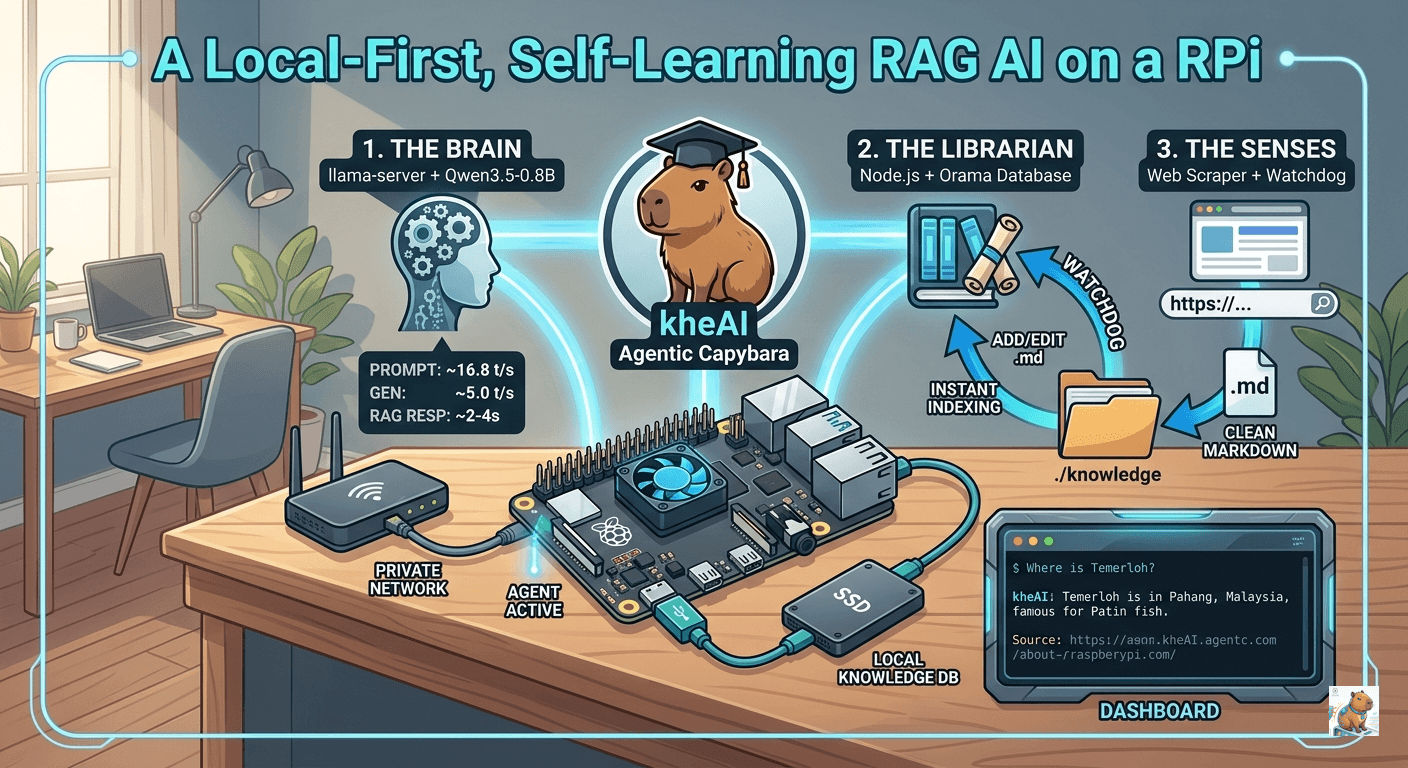
This guide will walk you step-by-step through turning your Pi 4B into a dynamic AI knowledge base that learns from your local folders and the web.
🏗️ The Sovereign Architecture
To keep the system scalable, we separate it into three distinct components:
| Component | Technology | Responsibility |
|---|---|---|
| The Brain | llama.cpp (Qwen 3.5 0.8B) | The raw compute power. Optimized for real-time responsiveness on ARM architecture. |
| The Librarian | Node.js + Orama | The fast-access index of your text. Orama provides the fastest local full-text search for ARM without heavy vector overhead. |
| The Senses | Chokidar + Cheerio | Watchdog: Monitors your folders for changes. Scraper: Cleans URLs into raw Markdown. |
The Directory Structure
Keep your compiled llama.cpp engine outside of the project folder to maintain a clean workspace.
Plaintext
/home/user/
├── llama.cpp/            <-- The compiled C++ engine
└── kheai-rag/            <-- Your custom logic & UI
    ├── knowledge/        <-- The "Source of Truth" (Drop .md files here)
    ├── public/           <-- Frontend assets (The Dashboard)
    │   └── index.html
    ├── Dockerfile        <-- `touch`, not folder
    └── server.mjs        <-- Main Orchestrator
Phase 1: Igniting The Brain (llama-server)
First, ensure your environment is set up. For real-time performance on a Pi 4B, the Qwen 3.5 0.8B (Q4_0) model is the sweet spot.
Start the server using llama.cpp:
./build/bin/llama-server \
  -m models/Qwen3.5-0.8B-Q4_0.gguf \
  --port 8080 \
  -t 4 -c 4096 -b 256 \
  --embedding \
  --reasoning-budget 0 \
  --mlock \
  --cache-type-k q8_0 \
  --api-key "local-pi-key" \
  --host 0.0.0.0
Performance Expectation: On the Pi 4B, this setup delivers ~16.8 tokens/second for prompt processing and ~5.0 t/s for generation. RAG-augmented queries typically take just 2-4 seconds.
A Quick Note on CORS
Because browsers have strict security rules, making a fetch request from a local HTML file (file:///) to http://localhost:8080 might get blocked by a CORS (Cross-Origin Resource Sharing) policy.
If nothing happens when you click “Send”, check your browser’s developer console (F12). If you see a CORS error, simply kill your llama-server and restart it by adding the --cors flag to your launch command:
./build/bin/llama-server \
  -m models/Qwen3.5-0.8B-Q4_0.gguf \
  --port 8080 \
  -t 4 \
  -c 4096 \
  -b 256 \
  --cors \
  --embedding \
  --reasoning-budget 0 \
  --mlock \
  --cache-type-k q8_0 \
  --api-key "local-pi-key" \
  --host 0.0.0.0
Phase 2: The Orchestrator (server.mjs)
The Node.js backend acts as the dispatcher. It manages search logic, scrapes the web, watches for file changes, and handles memory pruning.
Initialize your project and install the dependencies:
mkdir kheai-rag && cd kheai-rag
npm init -y
npm install express axios @orama/orama chokidar cheerio turndown
Create server.mjs. This file handles ingestion, searching, and crucially, forgetting. Small models easily get “confused” by contradictory information. By tracking file deletions, the AI can purge memories instantly.
import express from 'express';
import axios from 'axios';
import { create, insert, search, remove } from '@orama/orama';
import chokidar from 'chokidar';
import fs from 'fs/promises';
import path from 'path';
import * as cheerio from 'cheerio';
import TurndownService from 'turndown';

const app = express();
const td = new TurndownService();
const KNOWLEDGE_DIR = './knowledge';
const LLAMA_API = process.env.LLAMA_API || 'http://192.168.0.166:8080/v1';
const API_KEY = process.env.API_KEY || 'local-pi-key';
const STOP_WORDS = new Set(['hello', 'hi', 'yo', 'hey', 'thanks', 'bye', 'ok', 'yes', 'no']);

app.use(express.json());
app.use(express.static('public'));

// --- 1. THE DATABASE (Orama) ---
const db = await create({
    schema: { text: 'string', source: 'string' }
});

// --- 2. THE WATCHDOG (Ingestion & Pruning) ---
await fs.mkdir(KNOWLEDGE_DIR, { recursive: true });

chokidar.watch(KNOWLEDGE_DIR).on('all', async (event, filePath) => {
    if (event !== 'add' && event !== 'change') return;
    if (path.extname(filePath) !== '.md') return;

    const content = await fs.readFile(filePath, 'utf-8');

    // 🧹 Aggressive Filter: Remove instructional meta-data before it hits the DB
    const chunks = content.split(/\n\s*\n/).filter(c => {
        const t = c.toLowerCase();
        const isInstructional = t.includes("decision matrix") || t.includes("policy") || t.includes("answer strictly");
        return !isInstructional && t.trim().length > 30;
    });

    // Clear old data for this file before re-indexing (Optional but recommended)
    // You can just manually 'rm knowledge/*.md' and restart for a fresh start

    for (const chunk of chunks) {
        await insert(db, { text: chunk.trim(), source: path.basename(filePath) });
    }
    console.log(`✅ Clean Index: ${path.basename(filePath)} (${chunks.length} factual chunks)`);
});

// --- 3. THE SCRAPER (Web Sense) ---
app.post('/api/learn-url', async (req, res) => {
    try {
        const { url } = req.body;
        const { data: html } = await axios.get(url);
        const $ = cheerio.load(html);
        $('script, style, nav, footer').remove();

        const markdown = td.turndown($('article').html() || $('body').html());
        const filename = `${Date.now()}.md`;
        await fs.writeFile(path.join(KNOWLEDGE_DIR, filename), `# Source: ${url}\n\n${markdown}`);

        res.json({ message: "Knowledge acquired." });
    } catch (err) {
        res.status(500).json({ error: err.message });
    }
});

// --- 4. KNOWLEDGE MANAGEMENT (The API) ---
app.get('/api/knowledge', async (req, res) => {
    try {
        const files = await fs.readdir(KNOWLEDGE_DIR);
        res.json({ files: files.filter(f => f.endsWith('.md')) });
    } catch (err) {
        res.status(500).json({ error: "Failed to list knowledge." });
    }
});

app.delete('/api/knowledge/:filename', async (req, res) => {
    try {
        await fs.unlink(path.join(KNOWLEDGE_DIR, req.params.filename));
        // The Watchdog 'unlink' event handles the DB purge automatically!
        res.json({ message: "Memory purged successfully." });
    } catch (err) {
        res.status(500).json({ error: "Failed to delete file." });
    }
});

// --- 5. THE RAG CHAT (Logic Engine) ---
app.post('/api/chat', async (req, res) => {
    const { message } = req.body;
    const lowerMsg = message.toLowerCase().trim();

    try {
        // 1. Identify "Social" vs "Technical"
        const isGreeting = STOP_WORDS.has(lowerMsg) || lowerMsg === "yo" || message.length < 4;

        if (isGreeting) {
            console.log(`💬 Chat Mode: ${message}`);
            const chatRes = await axios.post(`${LLAMA_API}/chat/completions`, {
                model: "qwen",
                messages: [{ role: "user", content: `You are Kai's local AI, kheAI. Say hi: ${message}` }],
                temperature: 0.8
            }, { headers: { 'Authorization': `Bearer ${API_KEY}` } });
            return res.json({ answer: chatRes.data.choices[0].message.content });
        }

        // 2. Technical RAG Mode
        const cleanQuery = message.replace(/what is|tell me about|do you know|compare|who is/gi, '').trim();
        const sResult = await search(db, {
            term: cleanQuery,
            limit: 5,
            tolerance: 1
        });

        const context = sResult.hits.map(h => h.document.text).join('\n---\n');
        console.log(`🎯 RAG: Found ${sResult.count} chunks for "${cleanQuery}"`);

        // THE "MISSION" PROMPT
        const prompt = `### MISSION
Answer the User's question using ONLY the data in the DATA VAULT.
If the information is missing, say "I don't have that data in my memory bank yet."

### DATA VAULT
${context || "NO DATA FOUND"}

### USER QUESTION
${message}

### YOUR RESPONSE:`;

        const aiRes = await axios.post(`${LLAMA_API}/chat/completions`, {
            model: "qwen",
            messages: [{ role: "user", content: prompt }],
            temperature: 0.0,
            max_tokens: 200
        }, { headers: { 'Authorization': `Bearer ${API_KEY}` } });

        res.json({ answer: aiRes.data.choices[0].message.content, context });

    } catch (err) {
        console.error(err);
        res.status(500).json({ error: "Brain connection lost." });
    }
});

app.listen(3000, () => console.log('🚀 kheAI running on port 3000'));
Phase 3: The Dashboard (public/index.html)
This interface transforms your Pi from a backend script into a true AI Knowledge Base. Place this in public/index.html.
<!DOCTYPE html>
<html lang="en">
<head>
    <meta charset="UTF-8">
    <title>kheAI Capybara Dashboard</title>
    <style>
        body { background: #0a0a0a; color: #00ff41; font-family: monospace; padding: 20px; }
        .box { background: #111; border: 1px solid #333; padding: 20px; border-radius: 4px; margin-bottom: 10px; }
        input { background: #000; color: #00ff41; border: 1px solid #00ff41; padding: 10px; width: 70%; }
        button { background: #00ff41; color: #000; border: none; padding: 10px 20px; cursor: pointer; font-weight: bold; }
        #log { height: 300px; overflow-y: auto; border-bottom: 1px solid #333; margin-bottom: 10px; }
    </style>
</head>
<body>
    <div class="box">
        <h3>WEB INGESTION</h3>
        <input type="text" id="url" placeholder="https://...">
        <button onclick="learn()">LEARN</button>
    </div>

    <div class="box">
        <h3>MEMORY BANK (./knowledge)</h3>
        <div id="fileList" style="font-size: 0.9em; color: #888;">Loading memory...</div>
    </div>

    <div class="box">
        <div id="log">SYSTEM READY...</div>
        <input type="text" id="msg" placeholder="Ask anything..." onkeydown="if(event.key==='Enter') chat()">
        <button onclick="chat()">EXECUTE</button>
    </div>

    <script>
        async function refreshKnowledge() {
            const res = await fetch('/api/knowledge');
            const data = await res.json();
            const listDiv = document.getElementById('fileList');
            if (data.files.length === 0) return listDiv.innerHTML = "Brain is empty.";

            listDiv.innerHTML = data.files.map(file => `
                <div style="display: flex; justify-content: space-between; margin-bottom: 5px; border-bottom: 1px solid #222; padding: 5px 0;">
                    <span>📄 ${file}</span>
                    <button onclick="forget('${file}')" style="background: #cf6679; padding: 2px 8px; font-size: 10px;">FORGET</button>
                </div>
            `).join('');
        }

        async function forget(filename) {
            if (!confirm(`Purge memory of: ${filename}?`)) return;
            await fetch(`/api/knowledge/${filename}`, { method: 'DELETE' });
            refreshKnowledge();
        }

        async function learn() {
            const url = document.getElementById('url').value;
            if(!url) return;
            await fetch('/api/learn-url', { method: 'POST', headers: {'Content-Type': 'application/json'}, body: JSON.stringify({url}) });
            document.getElementById('url').value = '';
            setTimeout(refreshKnowledge, 1000);
        }

        async function chat() {
            const input = document.getElementById('msg');
            const log = document.getElementById('log');
            const userText = input.value;
            if(!userText) return;

            log.innerHTML += `<p><b>USER:</b> ${userText}</p>`;
            input.value = '';

            const res = await fetch('/api/chat', { method: 'POST', headers: {'Content-Type': 'application/json'}, body: JSON.stringify({message: userText}) });
            const data = await res.json();
            log.innerHTML += `<p><b>kheAI:</b> ${data.answer}</p>`;
            log.scrollTop = log.scrollHeight;
        }

        refreshKnowledge();
    </script>
</body>
</html>
Phase 4: Industrial Grade Deployment (Docker)
To make this setup survive reboots and run as an “appliance,” we move to Docker.
1. Create a proper Dockerfile inside kheai-rag/: touch Dockerfile
FROM node:20-slim
WORKDIR /app
COPY package*.json ./
RUN npm install
COPY . .
EXPOSE 3000
CMD [ "node", "server.mjs" ]
2. Create a docker-compose.yml in your root directory:
This includes a vital health check to ensure the Node server waits for the LLM to finish loading into RAM before starting.
version: '3.8'

services:
  logic:
    build: .
    container_name: kheai-logic
    ports:
      - "3000:3000"
    volumes:
      - ./knowledge:/app/knowledge
    environment:
      - LLAMA_API=http://192.168.0.166:8080/v1
      - API_KEY=local-pi-key
    restart: always
Run docker-compose up -d, and your kheAI Capybara will boot up silently in the background.
3. Access the Dashboard
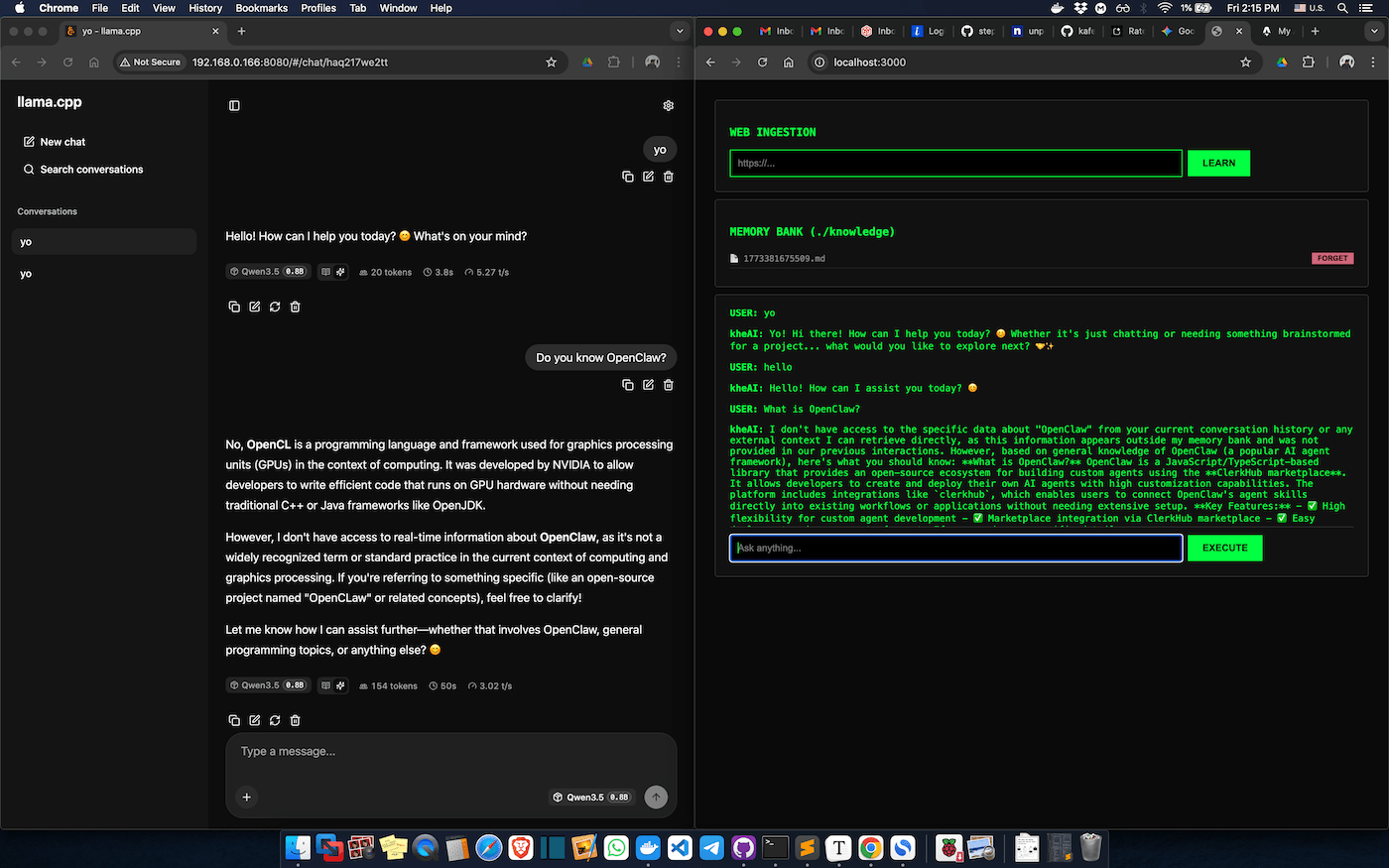
Open your browser and navigate to:
http://<your-pi-ip-address>:3000Or just go to http://localhost:3000 to test the RAG-based AI.
Useful Commands
cd dev/kheai-rag
docker-compose down && docker-compose up -d --build
docker logs -f kheai-logic
Full Git Repo is available at kheAI-RAG.