If you are trying to run Large Language Models (LLMs) on local hardware like a Raspberry Pi, you are likely chasing a ghost. I spent days trying to get Qwen3.5-4B to stop hallucinating on my Raspberry Pi 4B. The result? It was still wrong, and it was painfully slow.
Here is the hard truth: If a model is going to hallucinate anyway, you might as well use the fastest model possible and change your strategy. In this guide, I’ll show you how I stopped treating my Pi like a walking encyclopedia and turned a tiny 0.8B model into a high-speed “Logic Router” that powers my local agent infrastructure without the bloat.
1. The “Hallucination” Trap
The biggest mistake newbies make is trusting a Small Language Model (SLM) with facts. Even at 4B parameters, local models struggle with “World Knowledge.”
Look at what happened when I asked a 0.8B model about my home, Malaysia:
- The Model’s Fantasy: “Malaysia is an island nation… population was approximately 3 million. Temerloh is in Bavaria, Germany.”
- The Reality: Malaysia is a peninsula and part of an island (Borneo), with a population over 34 million. And Temerloh? That’s the heart of Pahang, Malaysia—famous for its Ikan Patin (silver catfish), not medieval German architecture.
The Lesson: Never trust a local SLM with facts. Use it for logic, routing, and formatting. Use the Cloud for the “Big Brain” stuff.
2. The Configuration
To get usable speed on a Raspberry Pi 4B (8GB), you can’t run default settings. You must optimize for the Cortex-A72 CPU and its specific memory bandwidth limitations.
cd llama.cppHere is the “Rational Bash” command I use for my PopeBot core. This setup prioritizes execution speed over “creative” fluff.
./build/bin/llama-cli -m models/Qwen3.5-0.8B-Q4_0.gguf \
  -t 4 \
  -c 1024 \
  --cache-type-k q8_0 \
  --cache-type-v q8_0 \
  --temp 0.0 \
  --reasoning-budget 0 \
  --repeat-penalty 1.2 \
  --mlock \
  -sys "Logic mode. Concise. 'RECOURSE' if unsure." \
  -cnv --color auto
Run this command to create your local endpoint:
./build/bin/llama-server \
  -m models/Qwen3.5-0.8B-Q4_0.gguf \
  --port 8080 \
  -t 4 \
  -c 4096 \
  --cache-type-k q8_0 \
  --cache-type-v q8_0 \
  --temp 0.0 \
  -b 256 \
  --reasoning-budget 0 \
  --repeat-penalty 1.2 \
  --mlock \
  --api-key "local-pi-key" \
  --host 0.0.0.0
Why These Flags Matter
Hardware & Memory Management
These flags are what keep your Pi from crashing or slowing down over days of 24/7 uptime.
-m models/Qwen3.5-0.8B-Q4_0.gguf: You loaded the ultra-lightweight 0.8 Billion parameter model. Unlike newerIQorK-Quantformats,Q4_0is a “legacy” format optimized for ARM NEON instructions. The CPU doesn’t have to perform complex “unpacking” math. This will run incredibly fast (likely 15+ tokens per second) and use barely any RAM.-t 4: Locks the processing to exactly 4 CPU threads, perfectly matching the Pi 4B’s physical cores.-c 4096: Caps the “memory space” (context window) at 4096 tokens, ensuring the background memory footprint never balloons out of control during a long conversation.-b 256: Limits how many tokens are processed at once when reading a prompt. This prevents sudden RAM usage spikes that cause Out-of-Memory (OOM) crashes.--cache-type-k q8_0&--cache-type-v q8_0: This quantizes the KV Cache (the memory the AI uses to remember the current conversation) from 16-bit down to 8-bit. It halves the RAM required for the context window with almost zero loss in logic.--mlock: Crucial for Raspberry Pi. This forces the OS to lock the entire AI model into the physical RAM and prevents it from ever being “swapped” to the SSD. If an active model swaps to disk, your token generation grinds to a halt.
AI Logic & Personality Tuning
These flags strip away the “fluff” and force the AI to act strictly as a deterministic reasoning engine.
--temp 0.0: Sets the temperature to absolute zero. This removes all randomness and creativity. If you ask it the same question 100 times, it will give the exact same answer 100 times. Perfect for code parsing or strict logic evaluation.--reasoning-budget 0: Disables Qwen 3.5’s internal “thinking” loop, preventing the infinite overthinking spirals you experienced earlier. It forces a direct, immediate answer.--repeat-penalty 1.2: Applies a strong penalty to stop the model from repeating the same words or falling into a loop, which smaller models (like the 0.8B) are sometimes prone to doing.-sys "Logic mode. Concise. 'RECOURSE' if unsure.": Sets a hardcoded, permanent system prompt. Instructing it to output “RECOURSE” is a brilliant safety valve for an autonomous agent; your connecting script can detect that specific word and trigger a human handover or a safe fallback routine.
Network & Security
--port 8080: Opens the API on port 8080.--host 0.0.0.0: Binds the server to all network interfaces. Instead of just talking to itself (localhost), the Pi will now accept API requests from any other device on your local Wi-Fi network (e.g., your laptop connecting to the Pi’s IP address).--api-key "local-pi-key": Adds a mandatory password. Any script or service trying to use this API must include this Bearer token in the header.
Test
curl http://localhost:8080/v1/chat/completions \
  -H "Content-Type: application/json" \
  -H "Authorization: Bearer local-pi-key" \
  -d '{
    "model": "qwen3.5-0.8b",
    "messages": [
      {"role": "system", "content": "Logic mode. Concise. 'RECOURSE' if unsure."},
      {"role": "user", "content": "Where is China?"}
    ],
    "temperature": 0.0
  }'
3. The Strategy: The “Router” Architecture
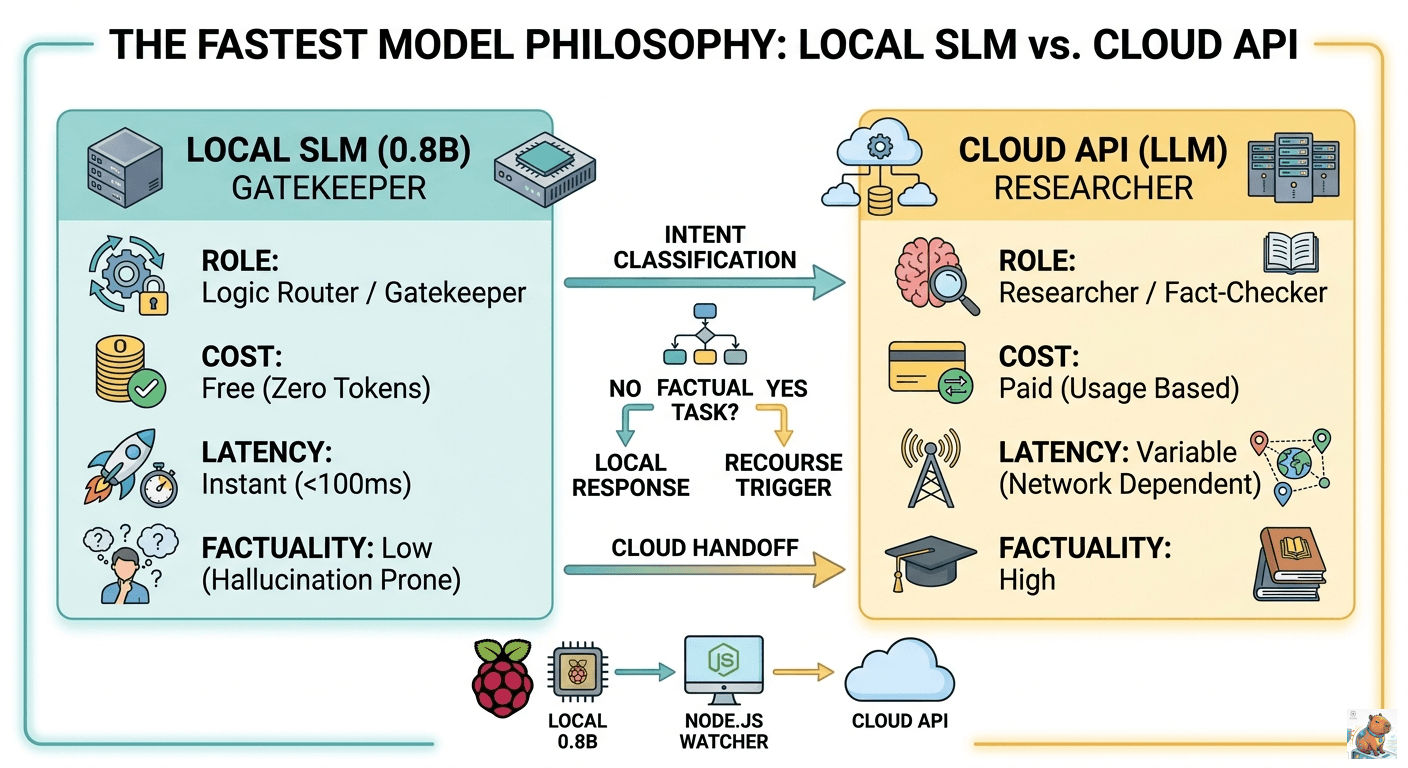
Since a local model is a fast but “dumb” clerk, I use it as a Gatekeeper. Instead of one model doing everything, I use a tiered workflow:
- The Local Clerk (0.8B): Runs on the Pi 4. It receives the user’s request.
- Intent Classification: The model decides: “Is this a simple greeting or a complex factual task?”
- The “RECOURSE” Trigger: If the task involves facts, math, or deep research, the local model is trained to output one word: “RECOURSE”.
- Cloud Handoff: My backend (Node.js/Python) sees the “RECOURSE” trigger and automatically forwards the prompt to a high-powered Cloud API (like Gemini or GPT-4).
Pro-Tip: This saves you 90% on API costs. The local model handles all the “Yo,” “How are you?”, and simple light-switch commands for free.
4. Step-by-Step Setup for Newbies
Step 1: Overclock your Hardware
If you are serious about “Mind Sovereignty,” you need to push the Pi. I run my Pi 4 at 2.0 GHz.
-
Ensure you have a heatsink and fan (active cooling is required).
-
Edit your config:
sudo nano /boot/config.txt -
Add these lines:
arm_freq=2000
over_voltage=6
Step 2: Download the “Speed King”
Don’t bother with 4B models for routing. They are too heavy for the Pi 4’s 64-bit bus. Get the Qwen3.5-0.8B-Q4_0.
curl -L https://huggingface.co/unsloth/Qwen3.5-0.8B-GGUF/resolve/main/Qwen3.5-0.8B-Q4_0.gguf -o models/Qwen3.5-0.8B-Q4_0.ggufStep 3: Use a “Strict” System Prompt
Stop trying to make the AI friendly. Make it a tool.
- Bad Prompt: “You are a helpful assistant who loves to chat and help people.”
- Good Prompt: “Logic mode. Concise. Respond ‘RECOURSE’ if the request requires factual data or complex reasoning.”
Summary: The “Fastest Model” Philosophy
| Feature | Local SLM (0.8B) | Cloud API (LLM) |
|---|---|---|
| Primary Role | Gatekeeper / Router | Researcher / Fact-Checker |
| Cost | Free (Zero tokens) | Paid (Usage based) |
| Latency | Instant (<100ms) | Variable (Network dependent) |
| Factuality | Low (Hallucination prone) | High |
By adopting this tiered approach, you keep your private logic local while leveraging the “big brains” in the cloud only when absolutely necessary.