If you spend enough time on Nostr, you start to see the matrix. The network is a beautiful, chaotic firehose of decentralized information. But what fascinated me wasn’t the social chat—it was the Zaps.
Zaps are instant, micro-payments made over the Bitcoin Lightning Network. Most people treat them like “fancy likes,” but I saw something else: cryptographic proof of economic intent. When money moves, it means something. A Zap isn’t just a notification; it’s a verifiable value transfer.
The problem? 99% of Zaps are social noise (“GM”, “LFG”, “Nice meme”). I wanted to find the 1% that represented real commercial signal—bug bounties, service payments, and professional contracts.
I needed an autonomous agent to watch the firehose, analyze the context, and filter the noise. So, I built the kheAI Zap Hunter.
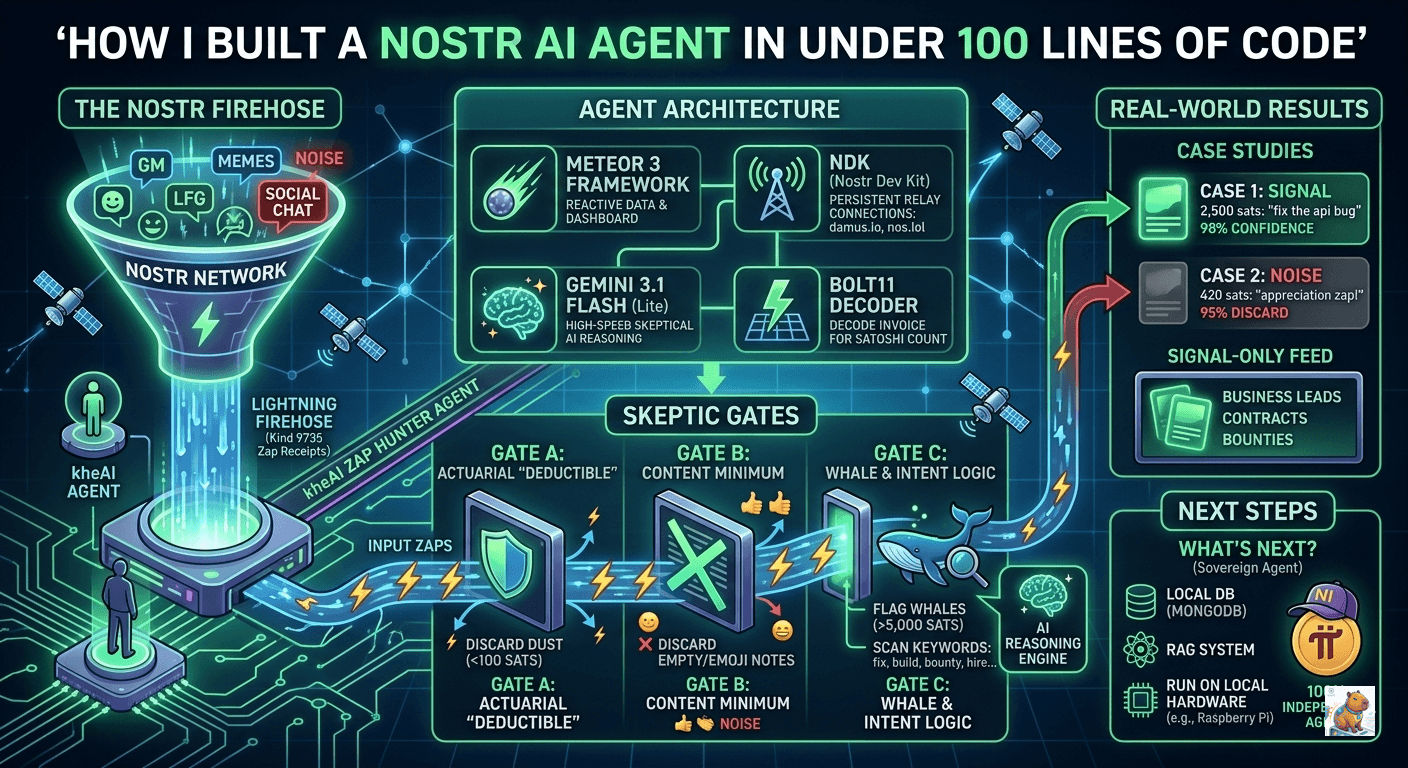
Here is my step-by-step guide to building a minimal, lightning-fast proof-of-concept (POC) using Meteor 3, the Nostr Dev Kit (NDK), and Google’s Gemini AI. 1 App. 1 Agent. 0 Databases. Let’s dive in.
Prerequisites
Before we start, you’ll need:
- Node.js installed on your machine.
- Meteor installed (
npm install -g meteor). - A free Gemini API Key from Google AI Studio.
Nostr 101
Building an AI agent on Nostr can feel like trying to drink from a firehose while reading the Matrix. If you are totally new to decentralized networks, Lightning payments, or coding in general, read this first.
I totally get it. When I first looked at a raw Nostr event, it just looked like a wall of random characters.
Let’s slow down. In this guide, we are going to strip away the jargon. We will break down exactly how the Nostr network actually works, what “Tags” are, and how our AI agent extracts the Who, To Whom, How Much, For What, and Why to find real economic signal in the noise.
Part 1: How Nostr Actually Works (The Relays)
If you use X (Twitter) or Facebook, you are using a centralized network. You ask Twitter’s server for your feed, and Twitter’s server gives it to you. If Twitter goes down, you see nothing.
Nostr is a decentralized protocol. There is no “Nostr Server.” Instead, there are thousands of independent Relays.
Think of a Relay like a public bulletin board in a coffee shop.
- When you post a message, your app “pins” that message to a few different bulletin boards (Relays).
- When I open my app, it checks those same bulletin boards to read your message.
- If one coffee shop burns down (a Relay goes offline), it doesn’t matter. The message is still pinned on five other boards.
Our agent, kheAI, is essentially standing in the middle of these coffee shops, watching every single piece of paper getting pinned to the boards in real-time.
Part 2: The Anatomy of a Zap (The Transaction Ledger)
A “Zap” is a micro-payment made using Bitcoin’s Lightning Network. But on Nostr, a Zap isn’t just a notification; it’s a verifiable, cryptographic receipt. It acts as a complete public transaction ledger.
When kheAI catches a Zap, it acts like an accountant. It needs to figure out five things:
- Who paid?
- To Whom did they pay?
- How Much did they pay?
- For What piece of content?
- Why did they pay?
To answer these, the agent reads the Tags.
Part 3: Decoding the Alphabet Soup (Tags)
Every action on Nostr (a post, a like, a zap) is called an Event. Every Event is packed with an array of “Tags” that organize the data. They are usually just single letters.
Here is the decoder ring for what our agent looks for:
| Tag Letter | What it means | How kheAI uses it |
|---|---|---|
p | Pubkey (Public Key). Think of this as a user’s permanent ID or account number. | To figure out the Who (Sender) and To Whom (Recipient). |
e | Event ID. The unique ID number of a specific post. | To find the exact post that was zapped. |
k | Kind. What type of post is this? (Kind 1 = Short Note, Kind 30023 = Long Article, Kind 34235 = Video). | To figure out For What format the user is paying. |
a | Address. Used instead of e tags for long-form articles to point to the author’s specific “address”. | A fallback to figure out the For What. |
bolt11 | The Lightning Invoice. The cryptographic proof of the payment. | To securely calculate exactly How Much was paid. |
description | The original request. This contains the note the sender typed out. | To figure out the Why. This is what we feed to the AI! |
By understanding the raw data structure of Nostr, you realize you aren’t just scraping a social media feed. You are parsing a globally synchronized, cryptographically secure economic ledger.
Once you learn how to read the tags (e, p, k), the network transforms from a wall of noise into a highly structured database of human intent.
The Setup (Scaffolding the App)
Now that you know the language, let’s look at how the core engine of our server (server/main.js) actually reads this ledger.
We are using Meteor 3. I chose it because of its incredible out-of-the-box reactivity—when the AI flags a “Signal,” I want my dashboard to light up instantly without needing complex state management. We’ll use Blaze for a stripped-down frontend.
We use a library called NDK (Nostr Dev Kit) to connect to the relays, and a library called light-bolt11-decoder to read the money.
Open your terminal and run:
# Create a barebones Meteor app using Blaze
meteor create zap-hunter --blaze
cd zap-hunter

# Install the essential packages
meteor npm install @nostr-dev-kit/ndk
meteor npm install @google/genai
meteor npm install light-bolt11-decoder
meteor add reactive-var
Building the Brain (server/main.js)
This single file is the workhorse of the entire operation. It connects to the Nostr relays, catches the firehose of Zap Receipts (Kind 9735), decodes the Lightning invoices, and asks the AI to score the transaction.
To keep this POC ultra-fast and frictionless, we aren’t using a database. The agent holds the last 15 leads in volatile server memory. If the server restarts, the memory clears.
1. Connecting and Listening
First, we tell the agent to listen specifically for “Kind 9735” events. On Nostr, 9735 is the official code for “A Zap Receipt.”
// Connect to the bulletin boards (Relays)
await ndk.connect(5000);

// Tell the agent: "Only look for Zap Receipts (Kind 9735)"
const sub = ndk.subscribe({ kinds: [9735], limit: 10 }, { closeOnEose: false });

sub.on("event", async (event) => {
   // A Zap just happened! Let's examine the ledger...
2. The “How Much” (Decoding the Money)
Notice how we decode the bolt11 string using light-bolt11-decoder. You cannot trust the standard “amount” tag on Nostr. Relay clients are lazy and often put “0” or “1” in the tag. Sometimes buggy apps report that 1,000,000 sats were sent when it was really 10. The Lightning invoice is the only source of truth. The only way to know the absolute truth is to decode the bolt11 invoice.
// Find the bolt11 tag
const bolt11Tag = event.tags.find(tag => tag[0] === 'bolt11');

let amountSats = 0;
if (bolt11Tag) {
    // Decode the invoice directly to find the true amount in millisatoshis
    const decoded = bolt11.decode(bolt11Tag[1]);
    const millisatoshis = decoded.sections.find(s => s.name === 'amount').value;

    // Divide by 1000 to get normal Satoshis
    amountSats = Math.floor(millisatoshis / 1000);
}
3. The “Who” and “To Whom”
We pull the p (pubkey) tags. Since public keys are massively long strings of gibberish (e.g., npub1xyz...), we just grab the first 8 characters to keep our dashboard clean.
// The 'description' tag holds a JSON package of the sender's info
const descriptionTag = event.tags.find(tag => tag[0] === 'description');
const zapRequest = JSON.parse(descriptionTag[1]);

// WHO sent it?
const senderPubkey = zapRequest.pubkey;
const shortSender = `${senderPubkey.substring(0, 8)}...`;

// TO WHOM was it sent? (The 'p' tag on the main receipt)
const pTag = event.tags.find(tag => tag[0] === 'p');
const recipientPubkey = pTag[1];
4. The “For What”
We look at the k (Kind) tag to see if they zapped a short note, a long article, or a video.
const kTag = zapRequest.tags.find(tag => tag[0] === 'k');
let contentType = "Unknown";

// Translate the number code into English
if (kTag) {
    if (kTag[1] === "1") contentType = "Short Note / Reply";
    if (kTag[1] === "30023") contentType = "Long-form Article";
    if (kTag[1] === "34235") contentType = "Video";
}
5. The “Why” (The AI Trigger)
Finally, we grab the actual text note the sender typed when they sent the money. This is the intent.
const noteContent = zapRequest.content || "";

// GATE C: Does this note actually look like business?
// We check for keywords. If it's just "GM", we drop it.
const intentWords = ['fix', 'build', 'bounty', 'hire', 'feature', 'tool'];
const hasIntent = intentWords.some(word => noteContent.toLowerCase().includes(word));
If the transaction passes our basic checks (it’s not for 1 penny, and it has actual words in the note), we bundle all this ledger data up and hand it to Google’s Gemini AI to make the final judgment.
// Handing the Ledger to the AI
const prompt = `
  User (${shortSender}) just sent ${amountSats} sats to User (${shortRecipient}) for a "${contentType}".
  They included this note: "${noteContent}".

  Determine if this is SIGNAL (a professional payment) or NOISE (a social like).
`;
// ... AI processes the prompt ...
Finally, replace the contents of your server/main.js with this:
import { Meteor } from 'meteor/meteor';
import NDK from '@nostr-dev-kit/ndk';
import { GoogleGenAI } from '@google/genai';
import bolt11 from 'light-bolt11-decoder';

// Grab your API key from the environment
const apiKey = process.env.GEMINI_API_KEY;
if (!apiKey) {
  console.error("❌ ERROR: GEMINI_API_KEY is not set!");
}

// Volatile memory to hold our processed leads
const volatileLeads = [];

// Initialize Gemini 3.1 Flash (Fast, cheap, and smart enough for intent parsing)
const ai = new GoogleGenAI({ apiKey: apiKey || 'dummy_key' });

// Initialize NDK with major relays
const ndk = new NDK({
  explicitRelayUrls: [
    "wss://relay.damus.io",
    "wss://nos.lol",
    "wss://relay.nostr.band",
    "wss://purplepag.es"
  ]
});

Meteor.startup(() => {
  console.log("⏳ Server boot sequence complete. Connecting to Nostr...");

  (async () => {
    try {
      // Connect to the bulletin boards (Relays)
      await ndk.connect(5000);
      console.log("🔥 Zap Hunter Online & Monitoring...");

      // Subscribe to Zap Receipts (Kind 9735)
      // Tell the agent: "Only look for Zap Receipts (Kind 9735)"
      const sub = ndk.subscribe({ kinds: [9735], limit: 10 }, { closeOnEose: false });

      sub.on("event", async (event) => {
        // A Zap just happened! Let's examine the ledger...
        try {
          // 1. EXTRACT CORE TAGS
          const descriptionTag = event.tags.find(t => t[0] === 'description');
          if (!descriptionTag) return; // Not a valid zap receipt

          const eTag = event.tags.find(t => t[0] === 'e');
          const zappedNoteId = eTag ? eTag[1] : event.id;

          const bolt11Tag = event.tags.find(t => t[0] === 'bolt11');
          const amountTag = event.tags.find(t => t[0] === 'amount');

          // 2. CALCULATE EXACT SATS (Never trust the client 'amount' tag!)
          // We decode the actual Lightning invoice for the absolute truth.
          let amountSats = 0;
          if (bolt11Tag) {
            try {
              const decoded = bolt11.decode(bolt11Tag[1]);
              const millisatoshis = decoded.sections.find(s => s.name === 'amount').value;
              amountSats = Math.floor(millisatoshis / 1000);
            } catch (e) {
              // Silently catch invoice errors and rely on the fallback below
            }
          }

          if (amountSats === 0 && amountTag) {
            amountSats = Math.floor(parseInt(amountTag[1]) / 1000);
          }

          // 3. PARSE SENDER & NOTE
          const zapRequest = JSON.parse(descriptionTag[1]);
          const shortSender = zapRequest.pubkey ? `${zapRequest.pubkey.substring(0, 8)}...` : "Unknown";
          const noteContent = zapRequest.content || "";

          const pTag = event.tags.find(t => t[0] === 'p');
          const recipientPubkey = pTag ? pTag[1] : "Unknown";
          const shortRecipient = recipientPubkey !== "Unknown" ? `${recipientPubkey.substring(0, 8)}...` : "Unknown";

          const kTag = zapRequest.tags.find(t => t[0] === 'k');
          const aTag = zapRequest.tags.find(t => t[0] === 'a');

          let contentType = "Short Note / Reply"; // Default
          let targetKind = kTag ? kTag[1] : (aTag ? aTag[1].split(':')[0] : null);

          if (targetKind) {
             switch(targetKind) {
                case "1": contentType = "Short Note"; break;
                case "30023": contentType = "Long-form Article"; break;
                case "34235": contentType = "Video"; break;
                default: contentType = `Kind ${targetKind}`;
             }
          }

          // ==========================================
          // 4. THE SKEPTIC GATES (Protecting our API quota)
          // ==========================================

          // Gate A: The Deductible (Ignore micro-dust < 100 sats)
          if (amountSats < 100) return;

          // Gate B: The Content Minimum (Ignore empty or 1-emoji notes)
          if (noteContent.trim().length < 3) return;

          // Gate C: Whale & Intent Logic (Only trigger AI if it looks promising)
          const intentWords = ['fix', 'build', 'bounty', 'hire', 'feature', 'tool'];
          const hasIntent = intentWords.some(word => noteContent.toLowerCase().includes(word));
          const isWhale = amountSats > 5000;

          if (!hasIntent && !isWhale) return;

          // ==========================================

          console.log(`🎯 TARGET SPOTTED: "${noteContent.substring(0, 20)}..." (${amountSats} SATS)`);

          // 5. ECONOMIC INTELLIGENCE ANALYSIS (The AI Prompt)
          const prompt = `
            You are an Economic Intelligence Agent.
            Context: User (${shortSender}) just sent ${amountSats} sats to User (${shortRecipient}) for a "${contentType}".
            The sender included this note: "${noteContent}".

            TASK: Determine if this is:
            1. SIGNAL: A payment for a service, a bug bounty, a commission, or a professional tool tip.
            2. NOISE: A "GM", a meme, general appreciation, or a random social "Like".

            BE SKEPTICAL.
            - If the note is empty, it is 99% NOISE.
            - If the note contains words like "fix", "feature", "build", "hire", or "thanks for the tool", it is SIGNAL.
            - Contextual Weight: A 5000 sat zap on an "Article" saying "Great write up" is NOISE. A 5000 sat zap on a "Short Note" saying "Fix this bug" is SIGNAL.

            Reply ONLY in JSON format exactly like this: {"confidence": 95, "verdict": "SIGNAL"}
          `;

          const result = await ai.models.generateContent({
            model: 'gemini-3.1-flash-lite-preview', // Lite is perfect for rapid parsing
            contents: [{ role: 'user', parts: [{ text: prompt }] }]
          });

          // Clean up the JSON response
          const rawText = result.candidates[0].content.parts[0].text.replace(/```json/g, '').replace(/```/g, '').trim();
          const aiResponse = JSON.parse(rawText);
          const isSignal = aiResponse.verdict.toUpperCase().includes("SIGNAL");

          console.log(`✅ Result: ${aiResponse.verdict} (${aiResponse.confidence}%)`);

          // 6. UPDATE IN-MEMORY DASHBOARD
          volatileLeads.unshift({
            id: event.id,
            zappedNoteId: zappedNoteId,
            amount: amountSats,
            note: noteContent,
            sender: shortSender,
            contentType: contentType,
            confidence: aiResponse.confidence,
            verdict: aiResponse.verdict,
            isSignal: isSignal,
            time: new Date().toLocaleTimeString()
          });

          // Keep memory clean (only keep last 15)
          if (volatileLeads.length > 15) volatileLeads.pop();

        } catch (err) {
            // Silently fail on bad JSON or parsing errors to keep the stream alive
        }
      });

    } catch (err) {
      console.error("❌ Startup Task Failed:", err.message);
    }
  })();
});

// Expose a method for the frontend to fetch the memory array
Meteor.methods({
  async 'getLatestLeads'() {
    return volatileLeads;
  }
});
The Dashboard UI (client/main.html)
I wanted a cyberpunk, terminal-style interface where the “Signal” actually glows green, and the social noise is dimmed out. Replace your client/main.html with this:
<head>
  <title>kheAI Nostr Zap Hunter</title>
  <style>
    body { background: #0a0a0a; color: #0f0; font-family: monospace; padding: 20px; max-width: 800px; margin: 0 auto; }
    .header-bar { display: flex; justify-content: space-between; align-items: center; border-bottom: 1px solid #333; padding-bottom: 10px; margin-bottom: 20px; }
    button { background: #333; color: #0f0; border: 1px solid #0f0; padding: 5px 15px; cursor: pointer; }
    button:hover { background: #0f0; color: #000; }

    .lead-card { border: 1px solid #333; padding: 15px; margin-bottom: 15px; border-radius: 4px; }
    .signal-glow { border: 1px solid #00ff00; box-shadow: 0 0 15px rgba(0, 255, 0, 0.2); background: rgba(0, 255, 0, 0.05); }
    .noise-dim { border: 1px solid #222; opacity: 0.5; color: #888; }

    .bolt { color: #ffcc00; font-weight: bold; margin-right: 15px; font-size: 1.2em; }
    .pubkey { color: #666; font-size: 0.8em; }
    .note { font-size: 1.1em; margin: 10px 0; color: #fff; }
    .ai-box { margin-top: 10px; border-top: 1px dashed #444; padding-top: 8px; font-size: 0.9em; display: flex; justify-content: space-between;}
    .verdict-signal { color: #00ff00; font-weight: bold; }
    .verdict-noise { color: #ff5555; }
  </style>
</head>

<body>
  <div class="header-bar">
    <h1>kheAI: Intelligence Feed</h1>
  </div>
  {{> leadBoard}}
</body>

<template name="leadBoard">
  <div style="margin-bottom: 20px;">
    Monitoring Nostr Firehose... ({{leads.length}} events in volatile memory)
    <button id="filter-toggle" style="float: right;">
      {{#if showOnlySignal}}Show All{{else}}Isolate Signal{{/if}}
    </button>
  </div>

  {{#each leads}}
    <div class="lead-card {{#if isSignal}}signal-glow{{else}}noise-dim{{/if}}">
      <div>
        <span class="bolt">⚡ {{amount}} SATS</span>
        <span class="pubkey">From: {{sender}}</span>
        <a href="https://primal.net/e/{{zappedNoteId}}" target="_blank" style="float:right; color:#00ffff; text-decoration:none;">Inspect Note ↗</a>
      </div>

      <p class="note">"{{note}}"</p>

      <div class="ai-box">
        <span><strong>Type:</strong> {{contentType}}</span>
        <span>
          <strong>Agent Verdict:</strong>
          <span class="{{#if isSignal}}verdict-signal{{else}}verdict-noise{{/if}}">
            {{verdict}} ({{confidence}}%)
          </span>
        </span>
      </div>
    </div>
  {{/each}}

  {{#if equals leads.length 0}}
    <p style="text-align: center; color: #666; margin-top: 50px;">Waiting for targets to pass the Skeptic Gates...</p>
  {{/if}}
</template>
The Frontend Logic (client/main.js)
Because Meteor 3 operates with asynchronous methods, we simply poll the server’s memory every 3 seconds to update our UI. It’s incredibly lightweight. Replace client/main.js with this:
import { Template } from 'meteor/templating';
import { ReactiveVar } from 'meteor/reactive-var';
import './main.html';

Template.leadBoard.onCreated(function() {
  this.leadsData = new ReactiveVar([]);
  this.showOnlySignal = new ReactiveVar(false);

  // Poll the server's in-memory array every 3 seconds
  this.interval = setInterval(async () => {
    try {
      const data = await Meteor.callAsync('getLatestLeads');
      this.leadsData.set(data);
    } catch (err) {
      console.error("Failed to fetch leads", err);
    }
  }, 3000);
});

Template.leadBoard.onDestroyed(function() {
  clearInterval(this.interval);
});

// A quick helper to allow equality checks in Blaze
Template.registerHelper('equals', function (a, b) {
  return a === b;
});

Template.leadBoard.helpers({
  leads() {
    const allLeads = Template.instance().leadsData.get();
    if (Template.instance().showOnlySignal.get()) {
      return allLeads.filter(l => l.isSignal); // Filter the noise!
    }
    return allLeads;
  },
  showOnlySignal() {
    return Template.instance().showOnlySignal.get();
  }
});

Template.leadBoard.events({
  'click #filter-toggle'(event, instance) {
    instance.showOnlySignal.set(!instance.showOnlySignal.get());
  }
});
Ignition!
You are ready. Open your terminal and inject your Gemini API key, then run the app.
(Note: On Mac/Linux use export, on Windows use set)
export GEMINI_API_KEY="your-api-key-here"
meteor run
Open http://localhost:3000 in your browser.
In your terminal, you will see the agent acting as a ruthless bouncer, discarding dust and low-effort emojis. When a viable target hits the firehose, you’ll see the AI interrogation happen in real-time:
⏳ Server boot sequence complete. Connecting to Nostr...
🔥 Zap Hunter Online & Monitoring...
🎯 TARGET SPOTTED: "Appreciate this 🌊..." (420 SATS)
✅ Result: NOISE (90%)
🎯 TARGET SPOTTED: "Here is the bounty for the bug fix..." (5000 SATS)
✅ Result: SIGNAL (95%)
On your dashboard, you can click “Isolate Signal” and watch as the noise fades away, leaving you with a feed of pure economic opportunity.
What’s Next?
Right now, kheAI is “volatile”—it lives and dies in server memory. My next step is to persist these high-value signals to a local MongoDB collection, and eventually transition the LLM from the cloud to an open-source model running natively on a Raspberry Pi.
When you eliminate the noise, the Nostr network isn’t just a social media platform anymore. It’s a real-time, global economy.