When I first started diving into the world of AI, Large Language Models (LLMs), and application development, I kept slamming into a brick wall of jargon. Everywhere I looked, developers were throwing around terms like “vector databases,” “embeddings,” and “semantic search” as if they were everyday vocabulary.
I was used to traditional databases—the kind that store data in neat rows and columns. I couldn’t figure out why AI suddenly needed a completely different system to store information.
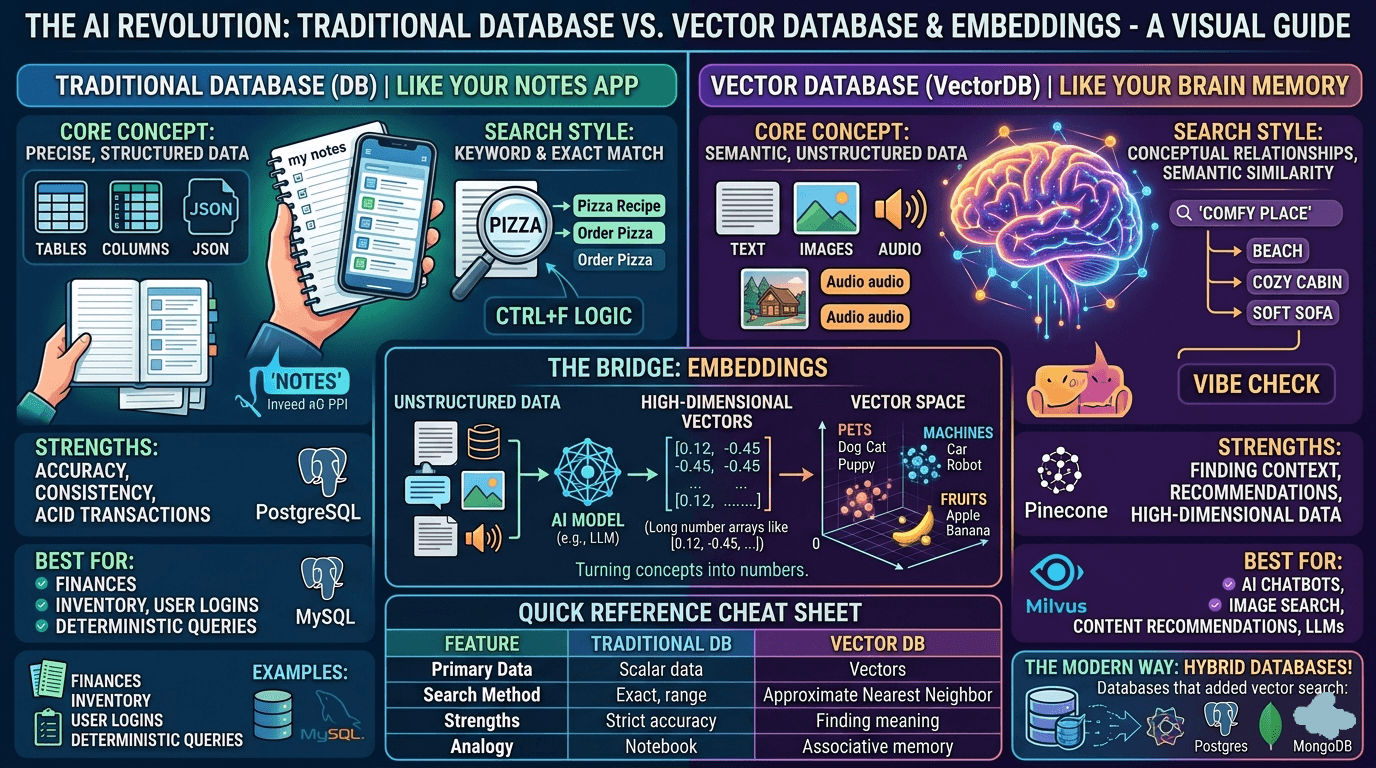
Then, I had an “aha!” moment that finally made it click. I realized that comparing a traditional database to a vector database is exactly like comparing your notebook to your brain.
If you are a newbie trying to wrap your head around how AI stores and retrieves information, let me walk you through exactly what I learned, from my own point of view.
The “Aha!” Moment: Notes vs. Brain Memory
Think about how you retrieve information in your daily life.
If you write something down in your notes app or a physical journal, finding it later requires an exact match. If you want to find that great Italian restaurant your friend recommended, you type “Italian restaurant” into the search bar. If you accidentally wrote “pasta place” or “Rome food” in your notes, the search bar will pull up absolutely nothing. It is literal and rigid.
But think about how your brain works. If someone says the word “beach,” you don’t just pull up a dictionary definition of a beach. Your brain instantly fires up a massive, interconnected web of concepts: ocean, sand, sunburn, seagulls, vacation, sunscreen. It retrieves information based on association, meaning, and context.
This is the exact difference between how traditional databases and vector databases look at the world.
1. Traditional Databases (The “Notes App”)
Traditional databases (like PostgreSQL, MySQL, or MongoDB) are the deterministic experts of the software world. They are designed to store, manage, and query precise, structured data.
- How they see data: They see your data as literal strings of text, numbers, JSON documents, or dates. When they look at the word “apple,” they do not see a fruit or a tech company; they strictly see the letters
a-p-p-l-e. - How they search: They use rigid, hard logic. You use tools like keyword matching, exact search, or alphabetical sorting.
- When to use them: They are perfect for things that demand 100% accuracy and strict rules. You want a traditional database running your bank account, your user passwords, and your inventory systems. You don’t want your bank guessing the “vibe” of your account balance.
2. Vector Databases (The “Brain”)
Vector databases (like Pinecone, Milvus, or Qdrant) were purpose-built for the AI era. They don’t store text the way we read it; they store mathematical representations of meaning.
- How they see data: They store embeddings.
- How they search: Instead of searching for exact keyword matches, they calculate mathematical distance to find data points that are conceptually “closest” to each other.
- When to use them: They are essential for AI applications, chatbots, recommendation engines, and image search. If you search a vector database for “smartphone,” it will easily hand you results for “iPhone,” “Android,” or “mobile device,” even if the word “smartphone” never once appears in the data. It searches by meaning, not by letters.
Wait, What Exactly is an “Embedding”?
This was the part that confused me the most. What makes a vector database so special? The secret sauce is the embedding.
An embedding is what you get when you pass unstructured data—a paragraph of text, an image, or an audio clip—through an AI model. The AI reads the data, figures out the human context, and translates that concept into a long array of numbers (e.g., [0.12, -0.43, 0.95...]).
Imagine a massive, multi-dimensional map. When the AI turns words into these number arrays (vectors), those numbers act as coordinates on the map.
- The vector for “Dog” and the vector for “Puppy” will be placed very close together.
- The vector for “Car” will be placed far away.
- The vector for “Cat” will be placed somewhat close to “Dog” (since both are pets), but not as close as “Puppy”.
When you ask an AI chatbot a question, your question is turned into a coordinate. The vector database simply looks at the map, finds your coordinate, and scoops up all the data sitting in that immediate neighborhood. It is incredibly fast and conceptually brilliant.
The Quick Reference Cheat Sheet
To help solidify the concepts, here is a quick breakdown of how they stack up against each other:
| Feature | Traditional Database | Vector Database |
|---|---|---|
| Primary Data Type | Scalar data (strings, numbers, booleans) | High-dimensional vectors (embeddings) |
| Search Style | Keyword, exact match (“Ctrl+F”) | Semantic, conceptual meaning (“Vibe Check”) |
| Retrieval Method | Strict rules, exact indexing | Approximate Nearest Neighbor (ANN) search |
| Best For | Financial ledgers, user profiles, inventory | AI chatbots, reverse image search, RAG systems |
| Analogy | Searching your physical notes | Recalling an associative memory |
The Plot Twist: The Line is Blurring Today
Here is the final thing I learned—and it’s a crucial reality check if you are building an app right now.
When the AI boom first started, purpose-built vector databases (like Pinecone or Weaviate) were the only way to get this done efficiently. But tech moves fast.
Today, you might not actually need a completely separate, dedicated vector database. The industry has shifted heavily toward a hybrid approach. Traditional databases have evolved to handle vectors natively. For example, if you already use PostgreSQL, you can simply install an extension called pgvector. This allows your trusty, traditional database to suddenly understand multi-dimensional embeddings and perform semantic search right alongside your standard data.
As a software engineer once wisely said: “The best vector database is the one you already have.” Unless you are building an enterprise AI system processing billions of embeddings with sub-millisecond latency requirements, modern relational databases can often handle both your “notes” and your “brain” workloads in one place.