Building a new skill for an AI agent from scratch might sound intimidating, but if you strip away the buzzwords, it’s actually quite straightforward. When you are running a local setup—like a Raspberry Pi sitting on your desk executing commands via a clean, modular CLI framework—you realize that teaching an AI to do something new is just about giving it the right instructions.
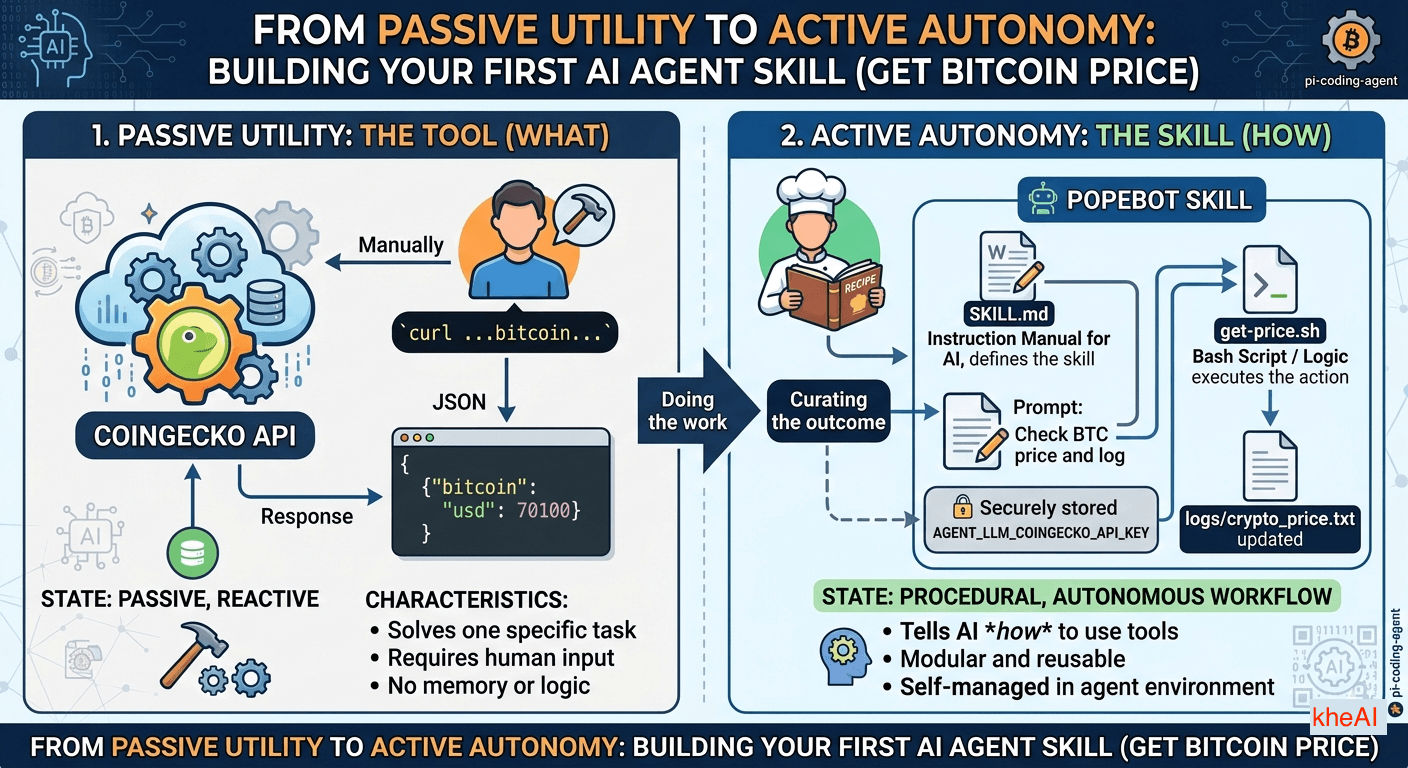
Recently, I used PopeBot (running on the pi-coding-agent) to build a simple cryptocurrency price tracker.
Before we write any code, we need to clarify a fundamental shift in how we build software today. We are moving from passive utility to active autonomy. We aren’t just “doing the work” anymore; we are curating the outcome. To understand this, you need to know the difference between a Tool and a Skill.
The Tool (The “What”)
A tool is a static instrument. It has no internal drive, memory, or opinion. It requires a human to provide the intent and the step-by-step execution.
- Characteristics: Reactive, passive, and discrete. It solves one specific problem when prompted.
- Examples: A hammer, a calculator, or a raw API endpoint.
The Skill (The “How”)
A skill is the logic, pattern recognition, and procedural knowledge required to use tools effectively. It is the bridge between a raw capability and a finished result.
- Characteristics: Represents a “recipe” or workflow. It is the ability to chain tools together to achieve a specific standard of quality.
- Examples: Carpentry, prompt engineering, or a custom bash script that tells an AI how to read and process data.
In the modern AI development era, “Skills” are becoming modular code. Instead of you needing the personal skill to write a complex database query, you give your AI agent a SKILL.md file that teaches it how to do it.
Let’s put this into practice by building a skill that fetches the latest Bitcoin price.
Step 1: Acquiring the Tool (CoinGecko API)
For this project, our Tool is the CoinGecko API. It is a passive resource that sits there waiting for something to wake it up and ask for data. It doesn’t care if Bitcoin is at 100,000; it simply provides the numbers.
To get started, you need an API key:
- Go to the CoinGecko API Demo page.
- Register for a free demo account.
- Generate your API Key. It will look like a random string of characters.
The Constraints: The free tier gives you 10,000 total monthly calls and a rate limit of 30 requests per minute—more than enough for a personal agent.
You can test the raw tool manually in your browser or terminal to see the JSON response:
https://api.coingecko.com/api/v3/simple/price?vs_currencies=usd&ids=bitcoin&x_cg_demo_api_key=YOUR_API_KEYStep 2: Securing the Keys
We need to give our agent access to this tool, but hardcoding API keys is a terrible practice. Instead, we will inject it securely into the agent’s environment.
Using the PopeBot CLI, run this command in your terminal to set the key as a secret:
npx thepopebot set-agent-llm-secret COINGECKO_API_KEY <your-api-key>Your terminal output should confirm the secret is stored securely:
kafechew@raspberrypi:~/keaibot $ npx thepopebot set-agent-llm-secret COINGECKO_API_KEY xxxxxxxxx
  Set GitHub secret: AGENT_LLM_COINGECKO_API_KEY
Step 3: Delegating the Build (Creating the Skill)
Instead of writing the boilerplate ourselves, we are going to act as the orchestrator and let the AI agent build its own skill. I prompted my agent with the following:
Can you help me get the latest Bitcoin price? I have a CoinGecko API. PS: I successfully set the secret:
AGENT_LLM_COINGECKO_API_KEY.
Because the framework is modular, the agent understood exactly what to do and proposed a job description to create two files:
SKILL.md: The instruction manual telling the AI what the tool is and when to use it.get-price.sh: The actual executable bash script that reaches out to the CoinGecko API.
Once I approved the plan, the agent generated the files and symlinked them to activate the skill.
Step 4: The Code Breakdown
Here is what the agent built under the hood.
The Knowledge (skills/coingecko-price/SKILL.md)
This file acts as the AI’s internal documentation. It reads this to understand its new capability.
---
name: coingecko-price
description: Fetch cryptocurrency prices from CoinGecko, supporting custom coin IDs and fiat currencies.
---

# CoinGecko Price

This tool fetches current cryptocurrency prices from CoinGecko.

## Usage

`skills/coingecko-price/get-price.sh [coin_id] [currency]`

## Example

`skills/coingecko-price/get-price.sh bitcoin myr`

## Prerequisites

- `COINGECKO_API_KEY` must be set in the environment.
The Action (skills/coingecko-price/get-price.sh)
This is the procedural layer. It translates the raw JSON from CoinGecko into something readable and logs it.
#!/bin/bash
# Fetches crypto price from CoinGecko
# Usage: ./get-price.sh [coin_id] [currency]
# Defaults: coin_id=bitcoin, currency=usd
# Requires COINGECKO_API_KEY as an environment variable

if [ -z "$COINGECKO_API_KEY" ]; then
    echo "Error: COINGECKO_API_KEY not set" >&2
    exit 1
fi

COIN_ID="${1:-bitcoin}"
CURRENCY="${2:-usd}"

# Ensure logs directory exists
mkdir -p logs

# Fetch price
PRICE=$(curl -s -H "x-cg-demo-api-key: $COINGECKO_API_KEY" "https://api.coingecko.com/api/v3/simple/price?ids=$COIN_ID&vs_currencies=$CURRENCY")

# Log price with timestamp
echo "$(date '+%Y-%m-%d %H:%M:%S') - $COIN_ID in $CURRENCY: $PRICE" >> logs/crypto_price.txt

# Output to console
echo "$PRICE"
Step 5: Testing the Autonomous Workflow
Now that the skill is merged and active, we can test it by giving the agent a high-level command. We don’t need to tell it how to do it anymore; we just ask for the outcome.
The Prompt:
Create a new file named `crypto_price.txt` in the `/logs` directory.
Check the latest bitcoin price and then append it into `logs/crypto_price.txt`
Because the agent now has the coingecko-price skill in its repository, it knows exactly which script to execute, reads the environment variable automatically, fetches the data, and logs it perfectly.
You’ve successfully moved from manually clicking an API link to commanding an autonomous system. You are no longer the engine; you are the conductor.